When analyzing malware, we gather things like hashes, IP addresses, domains, and changes made to the system. These can help us detect the malware again, but some are much easier for an attacker to change than others.
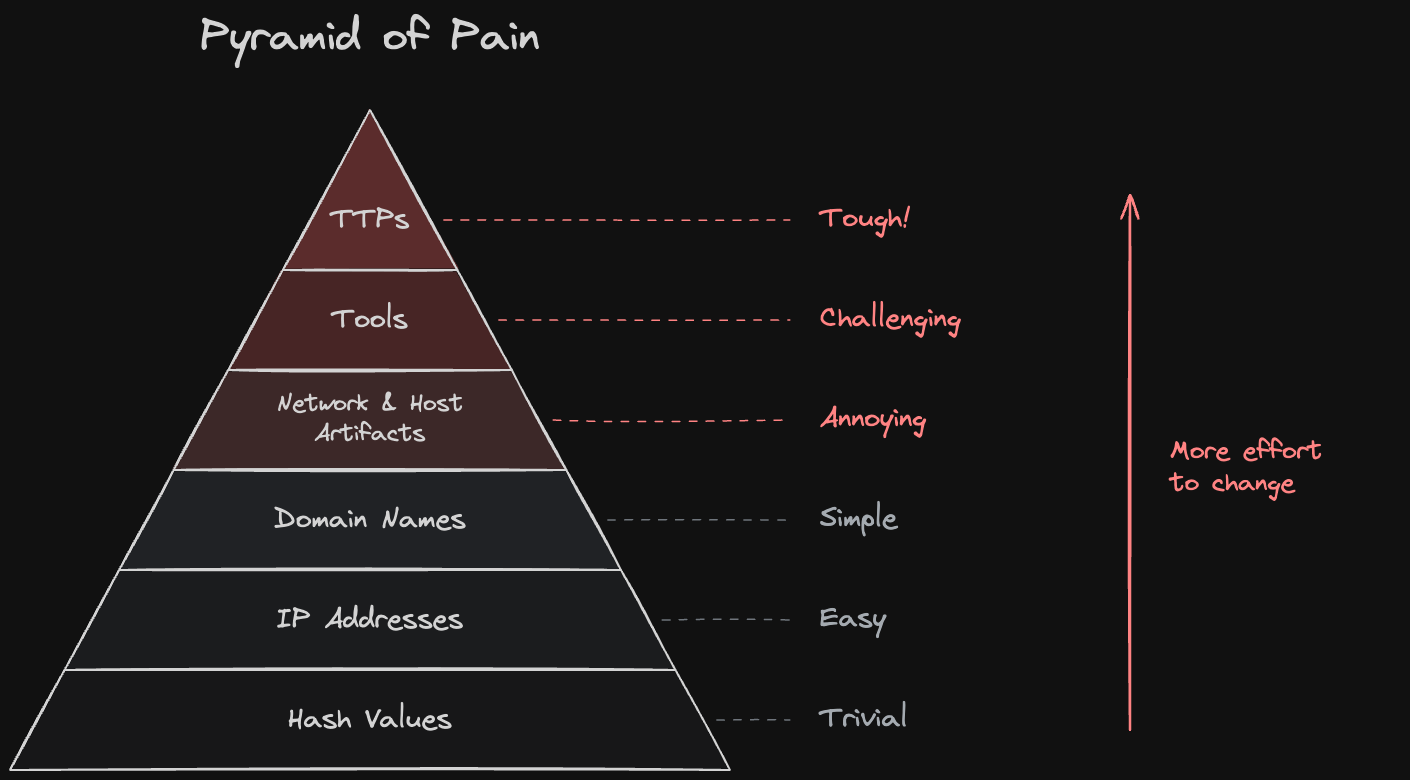
The Pyramid of Pain, introduced by David J. Bianco, shows how much effort we cause an attacker when we detect and stop different parts of their activity.1 The higher we go, the more they generally have to change to continue the attack.
Indicators of Compromise
An Indicator of Compromise (IOC) is a piece of evidence that can point to malicious activity. This could be the hash of a known malicious file, a domain used by malware, or a registry entry it creates.
In the Static Malware Analysis blog, I gathered hashes, strings, and API imports from the executable. During Dynamic Malware Analysis, I looked at what the sample actually did when running. The pyramid helps explain how these findings can be used and where their limitations are.
An indicator needs context. A temporary file may be normal, but an unexpected process launching it and adding it to startup deserves a closer look.
Hash Values
At the bottom are hash values, labeled Trivial. A hash is calculated from the contents of a file using an algorithm such as MD5, SHA-1, or SHA-256. It allows us to identify a particular sample, compare files, or check whether it has already been analyzed on VirusTotal.
The problem is that changing the file contents generally changes its hash. The attacker could modify an unused part of the executable without changing what the malware does, and a detection matching only the old hash would miss it. Renaming the file alone does not change its hash.
So a hash is useful when looking for the same sample, but it gives us very little coverage against modified versions.
IP Addresses
Next are IP addresses, labeled Easy. Malware may connect to a remote server to receive commands or send information back to the attacker. This is known as Command and Control (C2).2
If we identify the destination and block it, we may interrupt that connection. However, the attacker can move to another server or change the address their malware uses. Our rule for the previous IP would no longer cover the new destination.
An IP also needs context. Shared hosting can put legitimate services and malicious activity on the same address, so blocking it without checking can affect more than the attack.
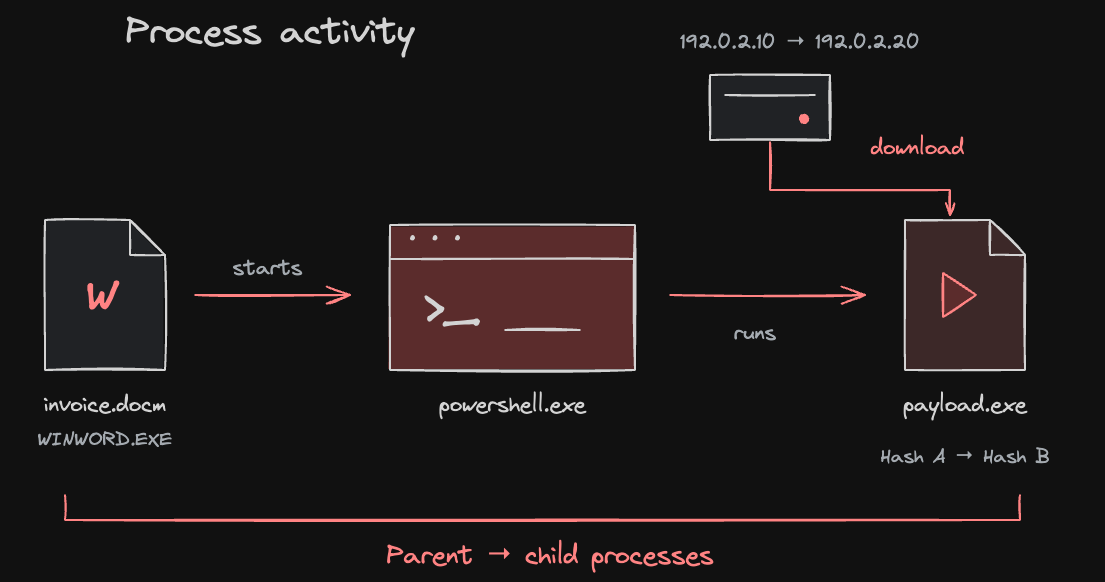
For example, a process might switch from 192.0.2.10 to 192.0.2.20. The old IP rule would miss it, but comparing process activity may connect the samples. These are documentation addresses.
Domain Names
Domain names sit above IP addresses and are labeled Simple. Through DNS, a domain can resolve to different IP addresses. Malware configured to contact a domain can keep using that name even when the server address changes.
For example, imagine malware contacting updates.example.com. A detection for that domain could still work after an IP change, as long as we can observe the name being requested. But if the attacker replaces the domain too, the exact match stops being useful.
Changing a domain may involve updating infrastructure and malware configuration, although attackers can also automate this. The effort shown by the pyramid is a general guide, rather than a fixed rule for every attack.
Network & Host Artifacts
Moving further up, Network & Host Artifacts are labeled Annoying. These are traces left by the malware on the system or in its network traffic.
Host artifacts can include dropped files, registry entries, services, or scheduled tasks. Network artifacts can include distinctive request paths, headers, or communication formats.
A sample might drop a file in AppData, add a startup entry, and repeatedly request a particular path. Together, these traces give us more to work with than its hash alone.
How we use them matters. Detecting one exact filename is easy to avoid by changing that name. Recognizing several related artifacts can require the attacker to change more of their configuration or code. We also need the right logs to see them in the first place.
In a lab, I would compare the system before and after execution, then trace new files, startup entries, and network requests back to the processes responsible.
Tools
The Tools level is labeled Challenging. Here we are trying to recognize the tool across different versions, rather than one specific copy of it.
Two executables can have different hashes while still sharing a distinctive configuration format, code patterns, or communication protocol. These similarities may let us detect both. YARA rules can help describe combinations of file characteristics, although a rule is only as useful as the patterns it matches.3
If changing a few strings no longer avoids detection, the attacker may need to make larger changes or replace the tool. That can mean development, testing, and learning how to use the replacement.
Testing related samples and clean files helps check whether a rule recognizes the tool or just a string that legitimate software also uses.
Tactics, Techniques and Procedures (TTPs)
At the top are TTPs, labeled Tough!. These describe how the attacker carries out the attack. A tactic is the objective, a technique is the method, and a procedure is the specific implementation.
MITRE ATT&CK provides a reference for these behaviors. For example, Execution is a tactic, and abusing PowerShell is covered by the sub-technique T1059.001.4
Consider an Office application unexpectedly starting PowerShell, which downloads and launches a file. Changing the downloaded file’s hash or its destination does not necessarily change that sequence. A detection using the related process activity could still catch it.
PowerShell itself is also used legitimately, so alerting on every execution would be noisy. We need to look at things like the parent process, command line, and what happens afterward.
Detecting the attacker’s method can force them to change how they operate, even if they already have a replacement executable ready.
Using the Findings
During analysis, I would keep the exact indicators alongside the actions that produced them. A hash can help locate copies of the executable, while a startup entry can help check whether it established persistence. Process and network records can then help explain what happened after it started.
Not every finding needs a blocking rule. Some help us search for related activity or support an investigation. An alert still needs a response before it interrupts the attack.
Conclusion
Hashes help us find known samples, while artifacts and behavior can reveal related activity after those hashes change. I want to record both the indicators and what produced them, so there is still something to investigate when the next executable looks different but carries out the same attack.
-
David J. Bianco, The Pyramid of Pain. First published in 2013; the hash level was added in the 2014 update. ↩︎